

Haulforge: Owner Operator IFTA
Trucking books, IFTA, GPS state miles and truck parking. Offline. No ads.

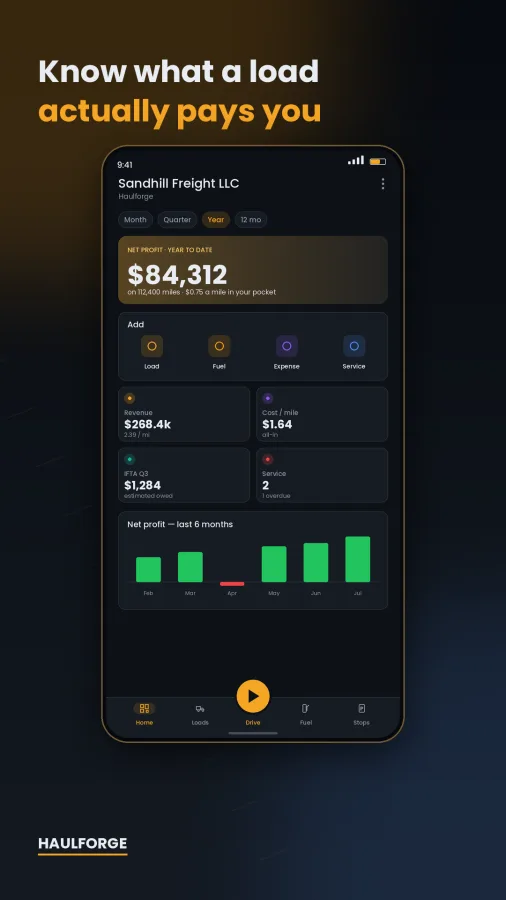
Haulforge is bookkeeping for owner-operators, built on one idea: a load's rate per mile is a number the broker says. Take-home is a number only you can see.
Everything runs on your phone. No account. No cloud. No ads.
━━━━━━━━━━━━
WHAT A LOAD ACTUALLY PAYS
━━━━━━━━━━━━
Type in the linehaul, the fuel surcharge, the deadhead, the dispatch fee. Haulforge subtracts the diesel that trip will burn at YOUR mpg and YOUR average price, subtracts your fixed cost per mile, and shows what lands in your pocket — while you're still on the phone with the broker.
Green badge or amber badge, against the rate per mile you refuse to run below.
━━━━━━━━━━━━
IFTA, FINISHED BEFORE SUNDAY DINNER
━━━━━━━━━━━━
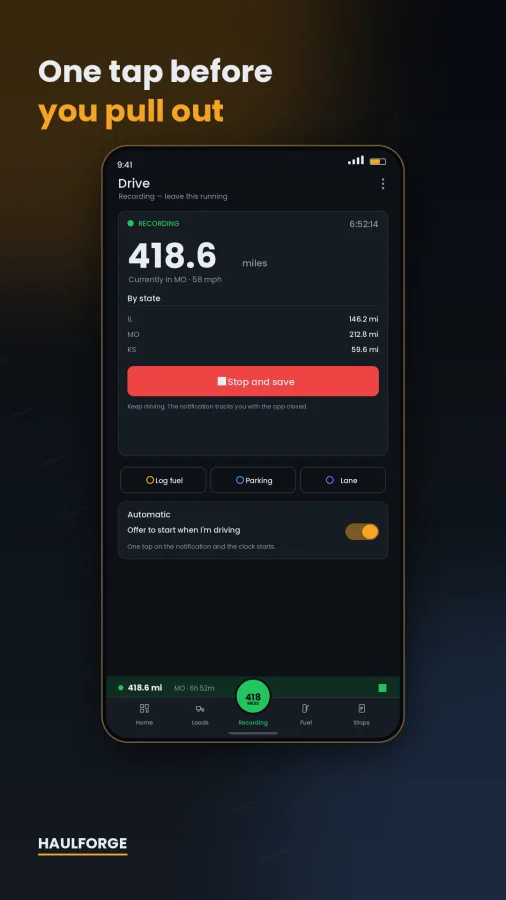
• GPS mileage tracking that names the state you're in and splits the miles for you
• Per-jurisdiction mileage on every load
• Fuel log with gallons, price, odometer, DEF flag
• Quarterly worksheet: taxable gallons, tax-paid gallons, net gallons, rate, tax due, credits
• All 58 jurisdictions, with rates you can edit each quarter
• Export it as a PDF or a CSV
━━━━━━━━━━━━
TRUCK PARKING AND LOW BRIDGES
━━━━━━━━━━━━
Truck stops, truck parking, rest areas and service plazas across North America. Filter by parking, diesel, DEF, showers, food, scales, Wi-Fi, restrooms, repair, 24/7 and free. See mapped space counts, stay limits and fees.
Tell Haulforge how tall your rig is and it flags the low bridges, tunnels and weight limits it knows about — red if you won't fit, amber if it's tight — near you and along the lane you're about to run.
Plan a lane and get every stop on it, ordered by mile marker, with gallons needed, fuel cost, how many fill-ups that is, and where your 11-hour clock runs out.
Navigation hands off to Google Maps, Waze, or whatever truck GPS you trust. Searched areas cache, so the map works in the dead zones.
━━━━━━━━━━━━
THE REST OF THE BUSINESS
━━━━━━━━━━━━
• Expenses across 23 deductible categories
• Receipt photos on every fuel, expense and repair entry
• Recurring costs — truck note, insurance, ELD plan — posted automatically
• Maintenance history and reminders by mile or by day
• Cost per mile, revenue per mile, net per mile, deadhead %, fleet MPG
━━━━━━━━━━━━
TAX TIME WITHOUT THE SHOEBOX
━━━━━━━━━━━━
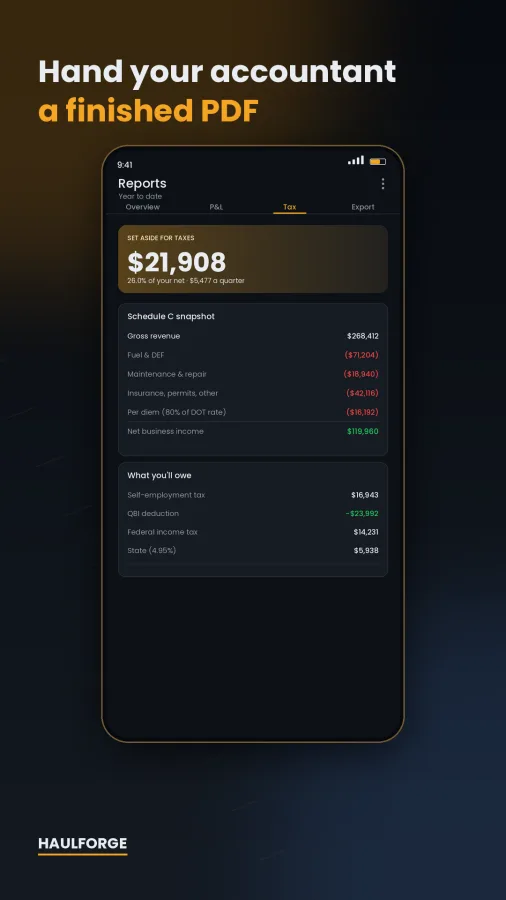
A Schedule C worksheet with your categories mapped to the lines they belong on. Self-employment tax with the wage-base cap, QBI, federal brackets, an optional state rate, and the DOT per diem at 80%. The four 1040-ES deadlines and what to send. A mileage log, expense ledger and fuel ledger that would survive an audit. One spreadsheet, twelve tabs.
Hand your accountant a finished PDF instead of a shoebox.
━━━━━━━━━━━━
YOUR BOOKS, YOUR PHONE
━━━━━━━━━━━━
Everything is stored on the device. A backup is a plain ZIP you write yourself, to a folder you choose. Restore it on any phone.
━━━━━━━━━━━━
FREE, AND WHAT ISN'T
━━━━━━━━━━━━
Free, for as long as you want it: unlimited loads, fuel, expenses and maintenance. One truck. The dashboard. The IFTA worksheet on screen. The parking map, the clearance layer and navigation. A backup you can carry off the phone.
Nothing you type in is ever held hostage.
Haulforge Pro adds: PDF and CSV exports, stops along your route, unlimited GPS mileage tracking, recurring expenses, unlimited receipts, more than one truck, and scheduled backups. 14 days free. Cancel any time in Google Play.
━━━━━━━━━━━━
HONEST ABOUT WHAT IT ISN'T
━━━━━━━━━━━━
Haulforge is not an ELD and does not record Hours of Service. It does not file your returns and is not a substitute for a tax professional.
It is not a truck-routing engine. It shows the low bridges OpenStreetMap knows about — not the ones nobody mapped — and it does not route you around any of them. An empty list is not a clear road. Watch your signs.
IFTA publishes new rates every quarter. Check them before you file.
Stop, parking and clearance data © OpenStreetMap contributors (ODbL).
Video
 Haulforge: Owner Operator IFTA
Screenshots





Free calculators
Try the tools in your browser. The app has them offline.
How-to guides
IRS Mileage Rate 2026: How to Claim the Mileage Deduction
The 2026 rates changed on July 1. Who can use the standard rate, what counts, the log you need and what it saves.
4 min readHow to Figure Your Cost Per Mile as an Owner-Operator
Fixed plus variable costs over every mile, including deadhead, then the break-even rate per loaded mile and what to charge.